Free
Get booked and stay organized, with no monthly fee.
$0Free plan
- Your own online booking page and shareable link
- 20 bookings per month
- 10 quotes and invoices per month
- Calendar view and email notifications
Fieldbookly lets customers book services or request a quote online, while you manage appointments, clients, quotes, and invoices. Built for plumbers, electricians, HVAC businesses, and handymen.
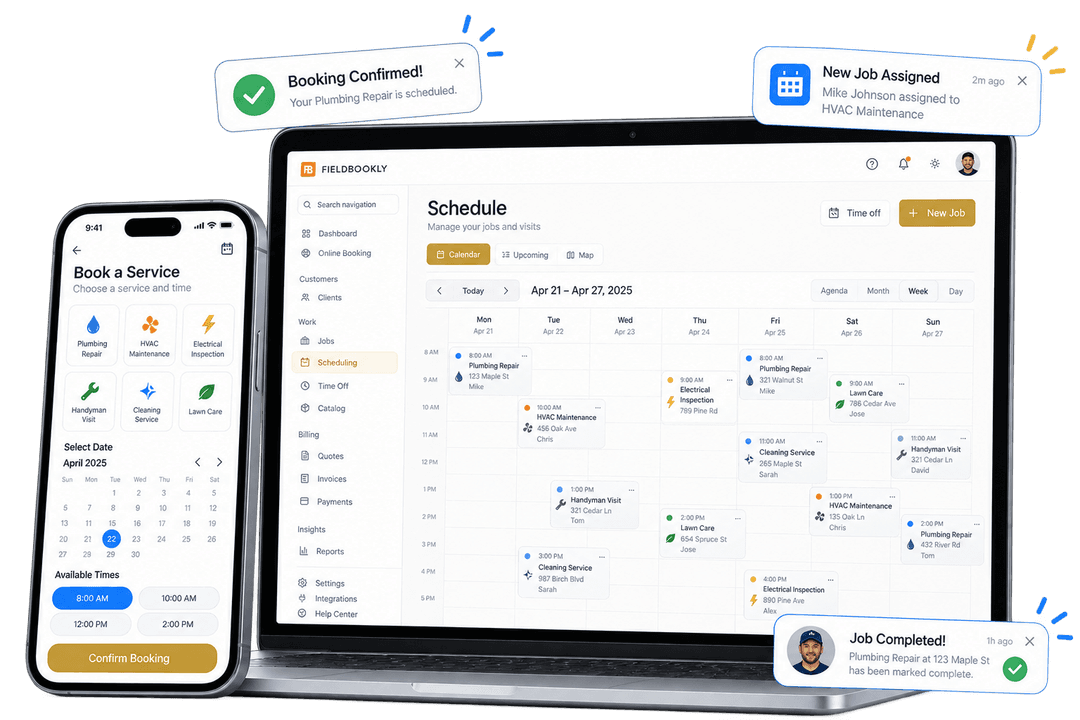

Customers choose from your services. Offer a booking or a quote request to suit the work.

Check the customer details, prepare a quote when needed, and plan the appointment before you head out.

Send an invoice when the work is ready to bill. Online payments and automatic payment reminders are available on paid plans.

Invite customers to leave a Google review and recommend you to others. Review automation and the referral program on paid plans help turn great service into repeat bookings and recommendations.
Recurring appointments, custom questions, deposits, and reminders require an appropriate paid plan. Team tools are available on Team. See what is included.
Prices in USD, billed annually. Monthly billing is also available.
Get booked and stay organized, with no monthly fee.
$0Free plan
Run your business from first booking to final payment.
With monthly billing:$29per month. With annual billing:$9.99/ month
$119.88 billed annually
Keep your crew coordinated and every job on track.
With monthly billing:$79per month. With annual billing:$45/ month
$540 billed annually
Payment processor fees apply. Additional Team members are billed separately; see the full plan comparison for limits and rates.
Scheduling & dispatch
Plan appointments in the weekly calendar, with visit times, customer details, and assigned technicians. On Team, the unassigned filter helps you find visits that still need someone to handle them.
Start Free
Job management
Open the job to review its schedule, service address, customer, description, and assigned technician. Keep the record available to your office and field team according to their permissions.
Start Free
Planning repeat visits? Compare plans with recurring appointments. For the customer's first step, explore quote requests and booking deposits.
A routine maintenance visit and an unfamiliar repair need different booking flows. Booking software for a trade business should let customers choose a service, provide their contact details and service address, and take the appropriate next step.
For bookable services, customers choose from available appointment times. For services that require a quote, they submit a request for you to review instead of receiving a confirmed appointment or a final price.
Booking is the customer's first step; scheduling is how you organize the work. Use Fieldbookly to review appointments, keep client and job details together, and manage quotes and invoices. Team adds technician assignment and team scheduling when more than one person handles the work.
Share your Fieldbookly booking link on your website, business profile, or in a message. Customers can submit bookings and requests outside your office hours; that does not mean you offer immediate or emergency attendance.
Customers can book available services outside office hours. Appointment choices follow your configured booking availability.
Review appointments in the calendar and use the mobile agenda to see the day's visits. Keep scheduled work separate from quote requests that still need assessment, and use recurring appointments on an eligible paid plan for repeat services.
On Team, assign appointments to technicians and review team schedules. Role-based permissions control which scheduling and customer information each person can access.
Keep client records, quotes, invoices, and scheduled work in one workspace. Paid plans add job notes and photos; Team adds shared checklists with photo and signature capture for work in the field.
The AI concierge offers a conversational way to describe a job and find a service. Customers can also use the service-selection booking flow.
Share your branded Fieldbookly booking page from your business profile, social accounts, emails, or text messages.
Link to your hosted page or use the booking widget with a plan that includes website embedding. You do not need to replace your existing website.
For eligible bookings, collect a deposit using your configured payment integration. Availability depends on your payment setup and booking settings.
Keep customers informed with booking confirmations and configured reminders. Messaging availability depends on your plan, settings, and applicable consent requirements.
Booking software for trades lets customers request onsite services online and helps the business manage the resulting work. Fieldbookly combines online service booking and quote requests with appointments, client records, quotes, and invoices for tradespeople and home service businesses.
Use a service configured to require a quote. The customer submits a quote request for review rather than choosing an appointment and receiving a confirmed booking. You can assess the work before agreeing on price and scheduling.
Yes. Customers can open your booking link, select a bookable service, enter their details and service address, and choose an available time. Quote-required services submit a request instead. Availability depends on how you configure your services and schedule.
Yes. Link to your hosted Fieldbookly booking page from your existing website, or embed the booking widget with a plan that includes website embedding.
Fieldbookly is designed for home service businesses, including plumbers, electricians, HVAC businesses, and handymen. Configure your own services and choose whether customers can book them directly or need to request a quote.
No. Customers can use the service-selection booking flow. The AI concierge is an additional conversational experience, not a requirement for every customer booking.
An appointment booking app primarily lets customers choose a time. A trade business also needs to assess quote requests, plan onsite visits, assign technicians, and record the work before invoicing. Fieldbookly combines booking and quote requests with appointments, client records, quotes, and invoices. Team scheduling and technician assignment require the Team plan.
Yes. Fieldbookly's Team plan includes team scheduling, technician assignment, and role-based permissions, with five team members included. Additional team members are billed separately. Solo operators can start with their own booking page and calendar without purchasing a team plan.
Yes. Fieldbookly's mobile web interface includes an agenda for appointments and access to job and client information according to your role and permissions. You can use it in your phone's browser. This does not imply automatic route optimization or live GPS tracking.
Fieldbookly offers a free plan with a booking page. Booking limits and access to features such as website embedding and messaging vary by plan. See the current pricing page for your currency and included features.
Set up your services, share your booking page, and manage the next step in Fieldbookly. Free to start.